
DedeCMS文章发布时间显示多少天,月,年前发布
原创吖七 2017-02-26 阅读()
DedeCMS时间格式比较多,下面是使用比较多的几种格式,如果希望实现文章发布不是具体的时间,而是几分钟、几天、几周、几个月、几年前之类的。
不过这种展示格式比较少用,适合博客、经常更新的网站,其实搜索引擎更喜欢下图“2026-10-09”的展示方式。
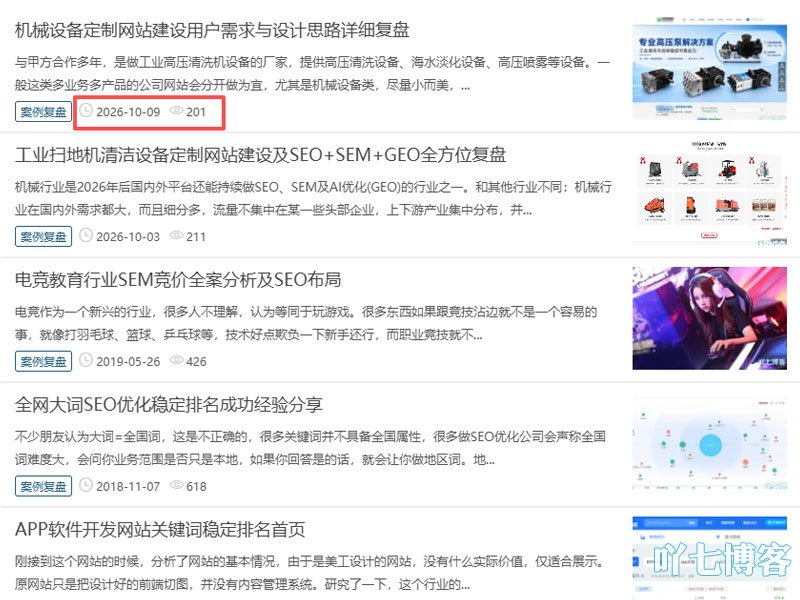
常见时间格式
[field:pubdate function="MyDate('Y-m-d',@me)"/]
展示:2013-12-17(推荐)

[field:pubdate function=MyDate('m-d',@me)/]
展示:12-17

[field:pubdate function=MyDate('y-m-d',@me)/]
展示:13-12-17

[field:pubdate function='strftime("%y-%m-%d %H:%M:%S",@me)'/]
展示:13-12-17 10:35:21

[field:pubdate function='strftime("%m-%d %H:%M:%S",@me)'/]
展示:12-17 10:35:21

[field:pubdate function='strftime("%y年%m月%d日",@me)'/]
展示:13年12月17日

[field:pubdate function='strftime("%Y年%m月%d日 %H点%M分%S秒",@me)'/]
展示:2013年12月17日 10点35分21秒
下面介绍如何在DedeCMS如何展示时间:几分钟、几天、几周、几个月、几年前的方法,有两种:
第一种 模板直接写PHP语句
[field:pubdate runphp='yes']
$today = Floor(time()/(3600 * 24));
$senday= Floor(@me/(3600 * 24));
$updays = $today-$senday;
if($updays >= 30 && $updays < 60) @me="1个月前";
elseif($updays >= 60 && $updays < 90) @me="2个月前";
elseif($updays >= 90 && $updays < 120) @me="3个月前";
elseif($updays >= 120 && $updays < 150) @me="4个月前";
elseif($updays >= 150 && $updays < 180) @me="5个月前";
elseif($updays >= 180 && $updays < 210) @me="6个月前";
elseif($updays >= 210 && $updays < 240) @me="7个月前";
elseif($updays >= 240 && $updays < 270) @me="8个月前";
elseif($updays >= 270 && $updays < 300) @me="9个月前";
elseif($updays > 300 && $updays < 330) @me="10个月前";
elseif($updays > 330 && $updays < 360) @me="11个月前";
elseif($updays >= 360) @me="一年前";
elseif($updays==0) @me = "今日";
else @me = $updays."天前";
[/field:pubdate]
直接在对应的模板使用即可,上面的代码适用{dede:list}和{dede:arclist}列表页调用,文章页面调用用
{dede:field.pubdate runphp="yes"}
$today = Floor(time()/(3600 * 24));
$senday= Floor(@me/(3600 * 24));
$updays = $today-$senday;
if($updays >= 30 && $updays < 60) @me="1个月前";
elseif($updays >= 60 && $updays < 90) @me="2个月前";
elseif($updays >= 90 && $updays < 120) @me="3个月前";
elseif($updays >= 120 && $updays < 150) @me="4个月前";
elseif($updays >= 150 && $updays < 180) @me="5个月前";
elseif($updays >= 180 && $updays < 210) @me="6个月前";
elseif($updays >= 210 && $updays < 240) @me="7个月前";
elseif($updays >= 240 && $updays < 270) @me="8个月前";
elseif($updays >= 270 && $updays < 300) @me="9个月前";
elseif($updays > 300 && $updays < 330) @me="10个月前";
elseif($updays > 330 && $updays < 360) @me="11个月前";
elseif($updays >= 360) @me="一年前";
elseif($updays==0) @me = "今日";
else @me = $updays."天前";
{/dede:field}
第二种 DedeCMS自定义函数
把下面的代码放在 include/extend.func.php 最下面即可
/**
*文章发布多少时间前
*by 吖七
*/
function tranTime($time) {
    $today = Floor(time()/3600 * 24);
    $senday = Floor($time()/3600 * 24);
    $updays = $today - $senday;
    if ($time < 60) {
        $min = floor($time / 60);
        $str = $min.'分钟前';
    }
    elseif ($time < 3600 * 24) {
        $h = floor($time / 3600);
        $str = $h.'小时前 '.$htime;
    }
    elseif ($time >= 3600 * 24 && $time < 3600 * 24 * 30 * 365) {
        $m = floor($time / (3600 * 24));
        $str = $m.'个月前 ';
    }

    elseif ($time >= 3600 * 24 * 30 * 365) {
        $y = floor($time / (3600 * 24 * 365));
        $str = $y.'年前 ';
    }
    else {
        $str = $rtime;
    }
    return $str;
 }
调用方法
列表页:[field:pubdate function="tranTime(@me)" /]
内容页:{dede:field.pubdate function="tranTime(@me)"/}
扩展阅读
本文地址:https://www.vi586.com/web/392.html
版权声明:本文是吖七(许祝岗)原创,文中无商业推广,内容仅供参考,欢迎分享本文,转载请保留出处!
- 上一篇:CSS清除浮动的方法与CSS选择器
- 下一篇:DedeCMS文章内容图片延迟加载